Rakuten Mobile Application Checklist for Foreign Residents in Japan

Applying for a mobile plan in Japan goes smoothly when you have everything ready before opening the application page. This original checklist covers the items foreign residents most often get stuck on: identity verification, payment registration, and SIM selection.
- Residence Card or Special Permanent Resident Certificate
- Payment method: credit card, Japanese debit card, or bank account transfer
- Rakuten ID and password
- NFC-compatible smartphone (for simple smartphone identity verification)
- Decision between physical SIM and eSIM
1. Prepare the right identity document
For most foreign residents, the main identity document is a Residence Card. A Special Permanent Resident Certificate is also accepted. The name and address you enter during the application should match your document as closely as possible.
If you have recently moved and have not updated your registered address, a mismatch can delay the identity review. Update your address at your local municipal office before applying.
Accepted identity documents
| Document | Who can use it |
|---|---|
| Residence Card | Mid- to long-term residents (work, study, family stay, etc.) |
| Special Permanent Resident Certificate | Special permanent residents |
2. Choose your identity verification method
If you have a Residence Card or Special Permanent Resident Certificate and an NFC-compatible smartphone, simple smartphone identity verification is the fastest route. The my Rakuten Mobile app reads the IC chip embedded in your card — it is not simply a photo of the document.
If your phone does not support NFC, you can still complete verification by another method, such as mailing a copy of a residence certificate where applicable. Applying at a Rakuten Mobile shop is also an option.
| Method | Requirements | Notes |
|---|---|---|
| Smartphone (NFC) | NFC phone + Residence Card etc. | Online, fastest — same day possible |
| Document mail | Residence certificate copy etc. | No NFC needed — takes a few days |
| Rakuten Mobile shop | Residence Card etc. | Staff assisted — in-person visit required |
3. Prepare a payment method
A credit card is the easiest choice. International cards (Visa, Mastercard) may work even if not issued in Japan. Japanese debit cards and bank account transfer are also available options.
Before applying, confirm that your card or bank account can be used for recurring monthly payments in Japan. Insufficient balance or payment errors can lead to service suspension.
4. Create or confirm your Rakuten ID
You need a Rakuten ID and password during the application. If you already use Rakuten Ichiba, Rakuten Pay, or any other Rakuten service, you may already have one. Check that you can log in before starting the mobile application.
If you do not have a Rakuten ID, you can create one for free before applying. Use the same email address for your Rakuten ID and your Rakuten Mobile account to avoid confusion.
5. Decide between SIM and eSIM
You will choose the SIM type during the application. Understanding the differences first prevents surprises after you complete the order.
| Type | Best for | Point to check |
|---|---|---|
| eSIM | People who want to start immediately, new arrivals | Your phone must support eSIM |
| Physical SIM | People using a phone without eSIM support | Delivery address and shipping time |
With eSIM, you can configure your line as soon as the application is approved. Physical SIM requires waiting for postal delivery.
Common mistakes to avoid
- Entering your name differently from your Residence Card
- Starting NFC verification with a phone that cannot read IC chips
- Choosing eSIM without confirming that the device supports eSIM
- Beginning the application without knowing your Rakuten ID password
- Not checking whether your payment method works for monthly billing in Japan
- Applying before updating an outdated registered address
Ready to apply?
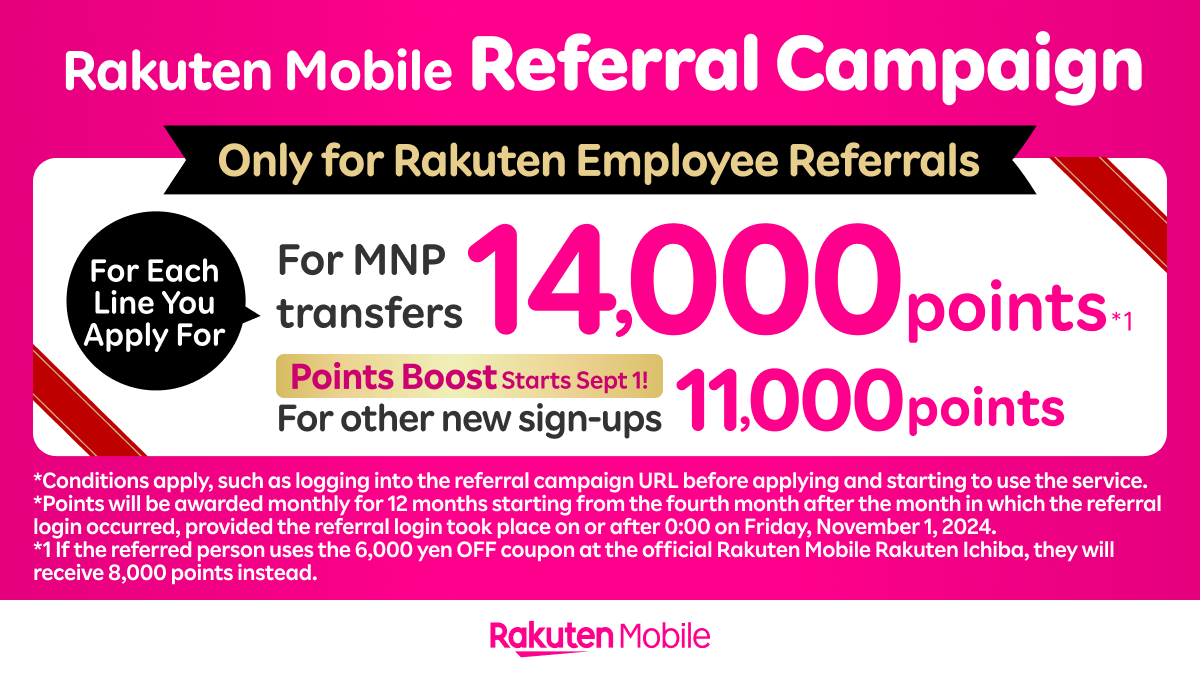
Open the official Rakuten Mobile application page via the referral link. Up to 14,000 points are available through the referral campaign.
 Apply for Rakuten Mobile →
※ Conditions apply, such as logging in via the referral URL or starting service use before applying. Points awarded in installments from 4 months after the referral login month.
Frequently Asked Questions
Can foreign residents apply online?
Do I need a Japanese credit card?
What if my smartphone does not support NFC?
What if my Residence Card address is outdated?
Summary — what to prepare before applying
- Have your Residence Card or Special Permanent Resident Certificate ready
- An NFC-compatible phone lets you complete everything online on the same day
- Confirm your payment method works for recurring monthly billing in Japan
- Check that you can log into your Rakuten ID before starting
- Decide between eSIM and physical SIM before opening the application page
Apply for Rakuten Mobile (Referral Campaign) →
Sources: Rakuten Mobile identity verification documents page, eSIM product page, and application support pages. This article is independently written and is not copied from any official page.
Plans and procedures may change. Always confirm details on the official Rakuten Mobile website before applying.
Affiliate Disclosure: This article contains affiliate links. If you apply through a link, we may earn a commission at no extra cost to you.