✨ Chosen by Foreign Residents in Japan ✨※1
How to Apply for Rakuten Mobile
Complete Guide for Foreigners & Residents in Japan
Entirely online • About 15 minutes • Full English support
※1 MMD Research Institute survey "Communication Services for Foreign Residents / April 2025" ↗ Rakuten Mobile Tops MMD Labo Survey as Most Used Mobile Service Among Foreign Residents
What You Need Before Applying
ID Document (one of the following)
Residence Card
Special Permanent Resident Certificate
Payment Method (one of the following)
Credit card (recommended) / Japanese debit card. Overseas-issued cards accepted. Bank account auto-pay also available.
RequiredRakuten ID & Password
Rakuten account. If you don't have one, you can create one for free via the application link.
RequiredNFC-Compatible Smartphone
Used to read the IC chip on your Residence Card or Special Permanent Resident Certificate. If not supported, you can also verify by mailing a copy of your resident record (Juminhyo).
Helpful to haveStep-by-Step Application Guide
-
1
Enter via Referral Link
Access the official Rakuten Mobile site via the button below. Entry via the referral link is required to earn points※1. The site and app are also available in English.
Apply for Rakuten Mobile (with referral campaign) →💡 Check if your phone is compatible
Most SIM-unlocked phones are supported. Check compatible devices on the official site ↗ -
2
Select a Plan
Proceed from the "Apply" button and select the Rakuten SAIKYO Plan. Choose from new contract, MNP (number transfer), or additional line.
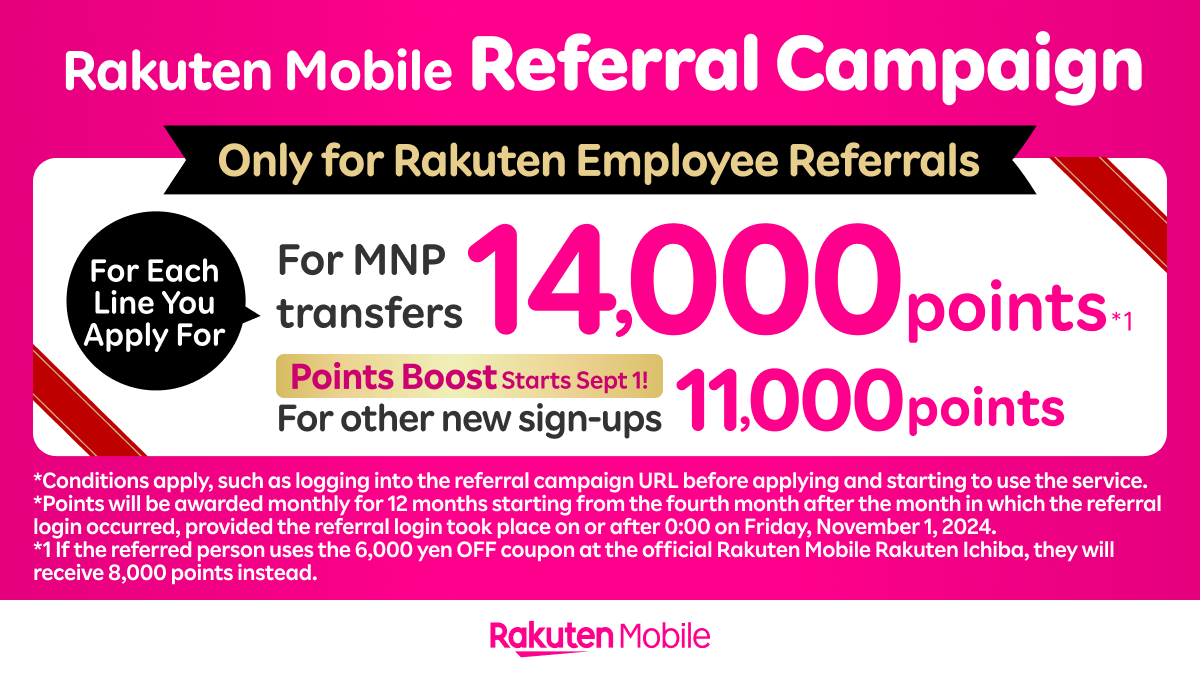
💡 MNP (Number Transfer): MNP earns 14,000 points; a new line earns 11,000 points via the current campaign※1. You may need to request an MNP transfer code from your current carrier before applying. -
3
Log In with Rakuten ID (or Create New)
Log in with your Rakuten account. If you already have a Rakuten Ichiba or Rakuten Pay account, you can use the same ID. New users can create an account with an email address in about 2 minutes.
-
4
Select SIM Type (Physical SIM or eSIM)
📦 Physical SIMDelivered to your address in 3–5 days. Compatible with almost all SIM-unlocked devices.
⚡ eSIM (Recommended)Start using immediately after application. No delivery needed. Compatible with iPhone XS and later, and many Android devices.
Instant activation -
5
Identity Verification (IC Chip Reading)
Use the my Rakuten Mobile app to NFC-scan the IC chip on your Residence Card or Special Permanent Resident Certificate.
- Download the my Rakuten Mobile app
- Select "Procedures" → "Identity Verification"
- Select "Smartphone IC Chip Verification"
- Hold your Residence Card against the back of your phone (NFC area) to scan
- Follow the on-screen instructions to complete
💡 NFC compatibility: Most iPhones support NFC. For Android, check that NFC is enabled in settings.📮 If your phone does not support NFC: You can also verify by mailing a copy of your resident record (Juminhyo) and similar documents.
🏪 In-store application also available: Rakuten Mobile shops accept Residence Card, Special Permanent Resident Certificate, or Diplomatic Identification Card (Certificate of Residential Address also required). -
6
Enter Payment Information
Register a credit card (recommended) or Japanese debit card. Visa and Mastercard accepted. Overseas-issued cards are also accepted. Bank account auto-pay is also available.
-
7
Activate SIM & Set Up Rakuten Link
Once your application is approved, follow the instructions to activate your SIM. For eSIM, scan the QR code for instant activation. For physical SIM, insert the card and follow the in-app steps.
📲 Don't forget: Download the Rakuten Link app to make domestic calls for free!※2
※1 Conditions apply, such as logging in via the referral campaign URL or starting service use before applying. Points will be awarded in installments starting 4 months after the referral login month.
※2 Under Rakuten Link. ¥22/30s without app. Some numbers excluded.
🎁 Earn up to 14,000 points by applying via referral link※1
Points can be used for mobile payments and shopping on Rakuten Pay.
 Apply for Rakuten Mobile (with referral campaign) →
Detailed application instructions are available on the campaign page.
See the Rakuten Mobile referral campaign page for full details →
※1 Conditions apply, such as logging in via the referral campaign URL or starting service use before applying. Points will be awarded in installments starting 4 months after the referral login month.